|
How do I temporarily hide one or more curves on a crowded document? |

  
|
|
How do I temporarily hide one or more curves on a crowded document? |
|
On the View menu, select "Hide curves...", then select the curves that you want to hide. All unchecked curves will remain visible. Visibility may be restored with the "Unhide all curves" command on the View menu.
Alternatively, if your document has a legend you may right-click on the legend entry for the curve you want to hide, then select "Hide <label>", or to hide all curves other than the selected one, select "Hide all but <label>" from the drop-down menu:

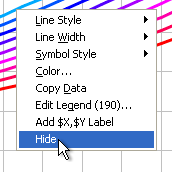
And as another alternative, you can right-click on a curve and select "Hide" from the drop-down menu:
You can also hide a curve by clicking the middle mouse button while the mouse points to a curve, hide all curves except the one pointed to by pressing CTRL + the middle mouse button, and make all curves visible by clicking the middle mouse button while the mouse does not point to a curve.
Page url:
https://www.dplot.com/help/index.htm?how_hidecurve.htm