|

  
|
||
|
|
||
Generates X,Y,Z triplets on a rectangular grid. If the active document contains a 3D scatter plot, a new data set will be created by this command and added to this document. For all other plot types, this command automatically opens a new window (if the current window contains a plot) and generates a contour plot of the generated data.
Function (sin, cos, etc.) arguments must be in parentheses. See the list of available functions.
You can use placeholder codes for certain data parameters. For example “$ZMAX” will be replaced with the maximum Z value of the surface. For more information on placeholder codes click here.
You can create conditional equations with the if function. The if function takes the form if(test,if_true,if_false), where test is the condition you want to check, if_true is the value the equation takes if test is true, and if_false is the value taken if test is false. For example, "if x > 5 then z=x^2, otherwise z=(10-x)^2" can be expressed with if(x<5,x^2,(10-x)^2).
By default, angular input values are in radians. You can set angles to degrees by clicking the degrees option button.
DPlot will automatically substitute the value of pi (3.141592653589793...) for "PI", "pi", or "Pi"
NOTE: Be specific. DPlot does not interpret "2X" as "2*X".
Example:
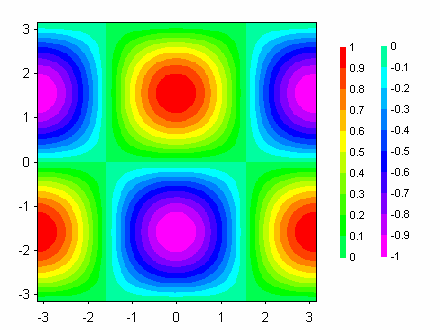
With radians selected, Z=cos(X)*sin(Y)
from X=-3.14 to 3.14 and Y=-3.14 to 3.14 results in:
Prevent divide by zero errors
If this box is unchecked, DPlot will trap divide by zero and many other math errors (e.g. logarithm of a non-positive value), report the value of X and Y where the error occurred, and will not generate a surface. If this box is checked, when DPlot traps a math error it will shift X and/or Y by a very small number and attempt the calculation again. This feature might be useful for generating curves of certain functions that would normally fail at specific values of X and Y.
Note: As far as DPlot is concerned, the grid produced by this operation retains the same constant spacing in X and Y, though X and/or Y may be shifted by a small value at one or more grid intersections.
Constants
You can specify up to 10 constants to use in place of numerical values in your equation. Often the use of constants will make your equation more readable and less error-prone.
Expand constants in legend/title
If unchecked, the title for a generated surface (or the legend entry for a 3D scatter plot) will generally match the equation as entered (plus a few formatting changes for subscripts and superscripts). If checked, any constants in the equation will be replaced by their numeric values.
Legend
By default the legend for the plot is drawn on the right side, as shown above. You can change the legend location by right-clicking on any of the numbers and selecting Left, Top, Right, or Bottom.
Change the font used in the legend by right-clicking on any of the numbers and selecting Font.
You can turn off (or subsequently back on) the legend by selecting the Countour Options command on the Options menu and unchecking (checking) the Legend box under Draw.
Page url:
https://www.dplot.com/help/index.htm?helpid_functionz.htm
