|

  
|
||
|
|
||
Shortcut:
 | Click  on the toolbar. on the toolbar. |
Performs a Fast Fourier Transform (FFT) on a selected data record. The input data must be evenly spaced (have a constant interval).
If you believe that an interpolation of your input data is appropriate (it is outside the scope of DPlot to determine the answer to that question for you), you can use the Equal Intervals command on the Edit menu to generate a plot with a constant interval in X prior to using the FFT command.
Unlike the other Generate commands, the FFT command creates a new document window for displaying the output, since the input and output records are in different domains.
Given a function of time h(t) with N consecutive sampled values, the FFT implementation used by DPlot calculates the corresponding function in the frequency domain as:
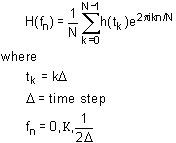
DPlot can use either of two FFT algorithms, dependent on the number of points (N) in the input record:
REALFT
Source: "Numerical Recipes" by W.H. Press, B.P. Flannery, S.A. Teukolsky, and W.T. Vetterling, Cambridge University Press, 1986.
REALFT requires that the number of points (N) in the input record be a power of 2.
EZFFTF
Developed by P.N. Swarztrauber, National Center for Atmospheric Research, Boulder, CO. Available on the World Wide Web at the NETLIB Repository, http://netlib2.cs.utk.edu.
EZFFTF does NOT have the same limitations on N, but can take significantly longer to compute the transform (see below).
The efficiency of the EZFFTF algorithm is highly dependent on the magnitude of the prime factors of N. For small prime factors, this routine is comparable in performance to the REALFT algorithm. However, for large prime factors, or for N equal to a large prime number, the run time of this routine can be several orders of magnitude longer than that for a comparable N consisting of small prime factors. The following table illustrates this.
|
|
Run Time |
|
|---|---|---|---|
|
Prime |
90 MHz |
1.6GHz |
16384 |
2^14 |
0.11 sec |
< 1 msec |
16379 |
19*431 |
1.00 sec |
187 msec |
16381 |
prime |
97. sec |
2.2 sec |
65536 |
2^16 |
0.50 sec |
15 msec |
65521 |
prime |
~33 minutes |
34 sec |
If N is not a power of 2, you can elect to pad the input record with 0 values out to the next higher power of 2 by selecting the first option in "Adjustment Options" in the "FFT Options" dialog box. This operation will significantly decrease the run time for FFT's on input records with N equal to a large prime. But, this option may not always be appropriate, and it is not possible for DPlot to determine whether this feature is appropriate to use for a given data set or for a particular application. If in doubt and the prime factors are large, use "Run the FFT as is" and prepare to wait a bit.
If N is a power of 2, DPlot will always use the REALFT routine, regardless of the option selected.
If you are reasonably certain that you will always select the same options for performing an FFT, you can prevent the "FFT Options" dialog box from being displayed by selecting the "Don't show this dialog box..." check box. If you later decide that you need to change one or more options, exit DPlot, edit the file DPLOT.INI (in the Application Data\DPlot folder), and find the line "FFTOption=0xnnnn", where nnnn is a hexadecimal number. Set this value to 0x0001 and start DPlot.
X units
These entries are only important for figuring out the relationship between the X units and Hertz (for time units) or the X axis label of the generated FFT for "Other". DPlot guesses at the units on entry to this dialog, based on the X axis label for the input data. If the units are incorrect when you click OK, then the frequency label for the FFT will be incorrect. For example, if the input is in milliseconds but you select seconds, the frequency values will be kilohertz rather than Hertz.
|
Related macro commands |
Page url:
https://www.dplot.com/help/index.htm?helpid_fft.htm

