|

Graph Software for Scientists and Engineers
|
|
|
|
|
|
|
PMT(rate,nper,pv,type)
Calculates the payment for a loan based on constant payments and a constant interest rate.
| rate | is the interest rate for the loan, consistent with the number of payment periods. For
example if the annual interest rate is 9% (0.09) and the payments are made monthly, then rate
should be 0.09/12. |
| nper | total number of payments for the loan. |
| pv | present value of the loan, also known as the principal. |
| type | indicates when payments are due. Set to 0 if payments are due at the end of each
period; 1 if payments are due at the beginning of each period. |
This function is identical to Microsoft Excel's PMT function with a future value of 0.
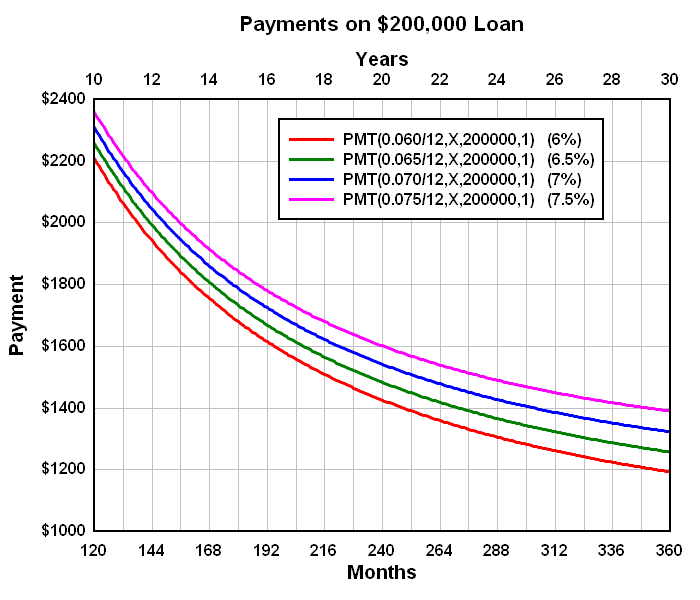
 Payment vs. Number of Payment Periods |
 Payment vs. Interest Rate |
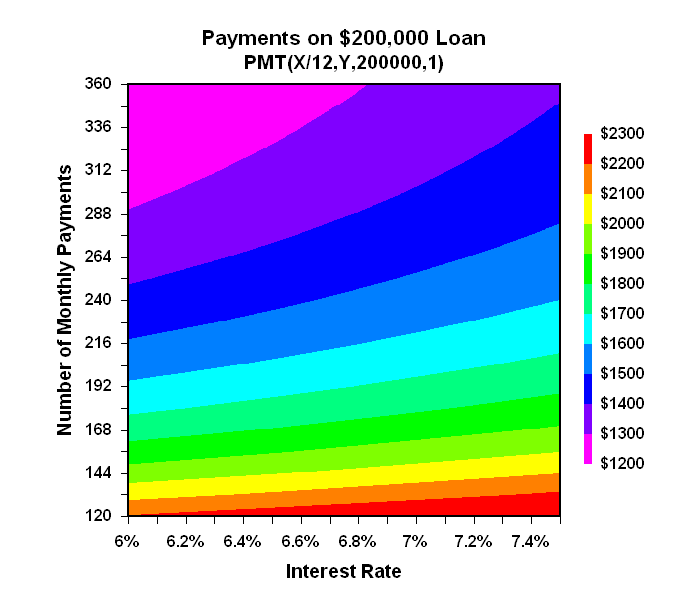
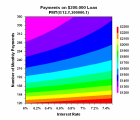 Payment vs. Interest Rate and Number of Payment Periods |
| Payment vs. Number of Payment Periods |
Payment vs. Interest Rate |
Payment vs. Interest Rate and Number of Payment Periods |
See also:
Trigonometric and General Math Functions
|
RUNS ON
Windows 10,
Windows 8,
Windows 7, 2008,
Vista, XP, NT,
ME, 2003, 2000,
Windows 98, 95
|
|
Copyright © 2023-2024 ARA